iptables' Four Tables and Five Chains and Basic Principles of NAT
As the most common userspace tool for controlling netfilter, the concepts of "four tables and five chains" in iptables can be confusing for beginners. This is the clearest article I've found so far that explains its structure and working process. Reproduced from https://tinychen.com/20200414-iptables-principle-introduction/.
This article is translated and reproduced from https://tinychen.com/20200414-iptables-principle-introduction/. It mainly introduces the basic working principles of iptables, the basic concepts of four tables and five chains, and how NAT works. All rights belong to the original author.
1. Introduction to iptables
Let’s first look at the description of iptables from the official netfilter website:
iptables is the userspace command line program used to configure the Linux 2.4.x and later packet filtering ruleset. It is targeted towards system administrators.
Since Network Address Translation is also configured from the packet filter ruleset, iptables is used for this, too.
The iptables package also includes ip6tables. ip6tables is used for configuring the IPv6 packet filter.
In other words, iptables is actually just a management tool for the Linux firewall located in the userspace for system administrators. The actual firewall functionality is implemented by netfilter, which is a kernel module in Linux that performs packet filtering. The corresponding module in the kernel for iptables is ip_tables. When we check the ip_tables information in the system kernel, we can see that the ip_tables.ko module is located under the netfilter directory.
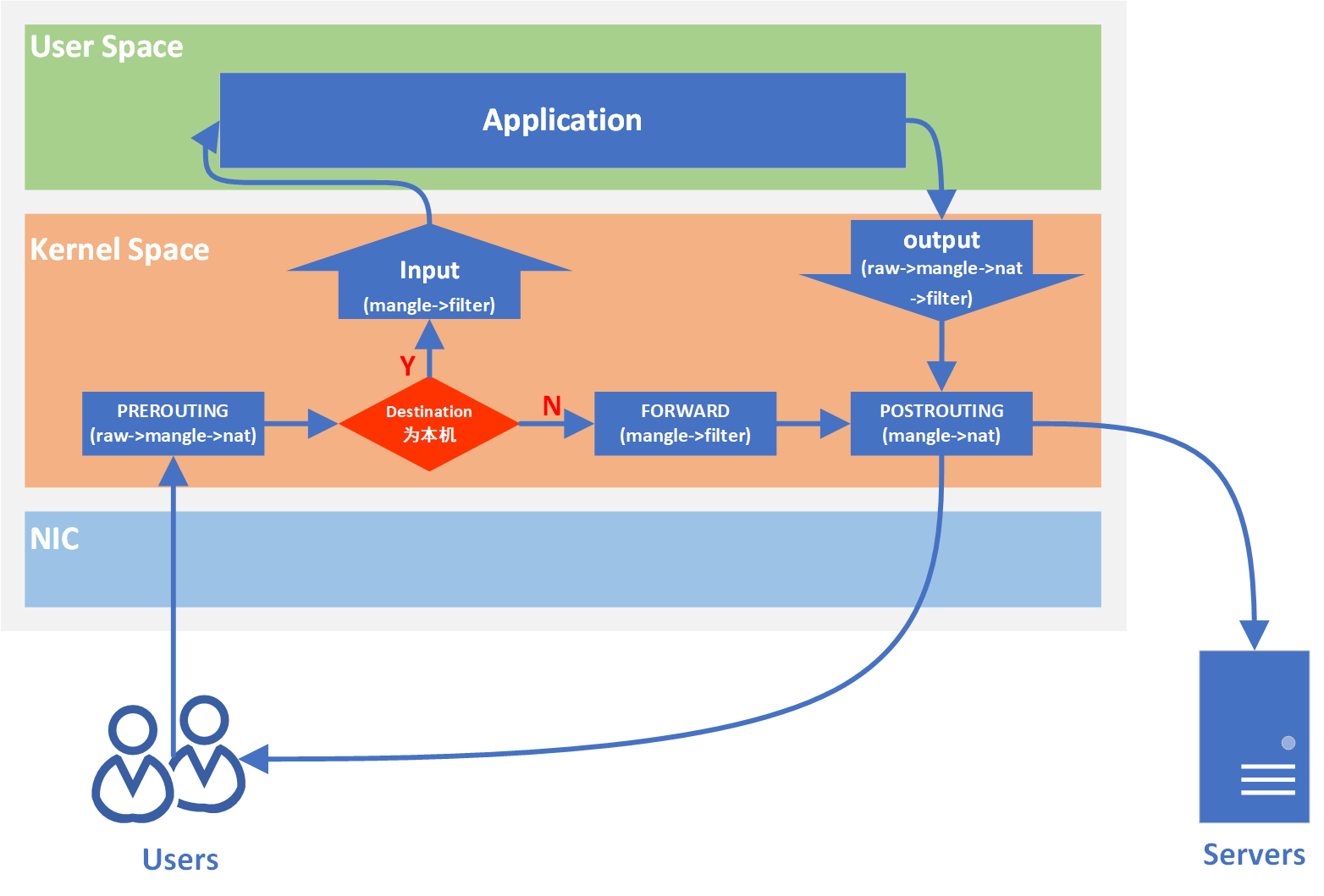
In CentOS 7, there is a nat table in the input chain, but this was not present in CentOS 6.
It is called a “chain” because when a chain is accessed, the matching and execution operations are performed sequentially according to the tables corresponding to each chain. For example, the PREROUTING chain corresponds to (raw -> mangle -> nat). Each table is connected according to priority, and each table may contain multiple rules. Consequently, the final structure looks like a chain, hence the name. The tables in iptables store the corresponding rules and operations to be executed. Here we take a router as an example to view its filter table in iptables:
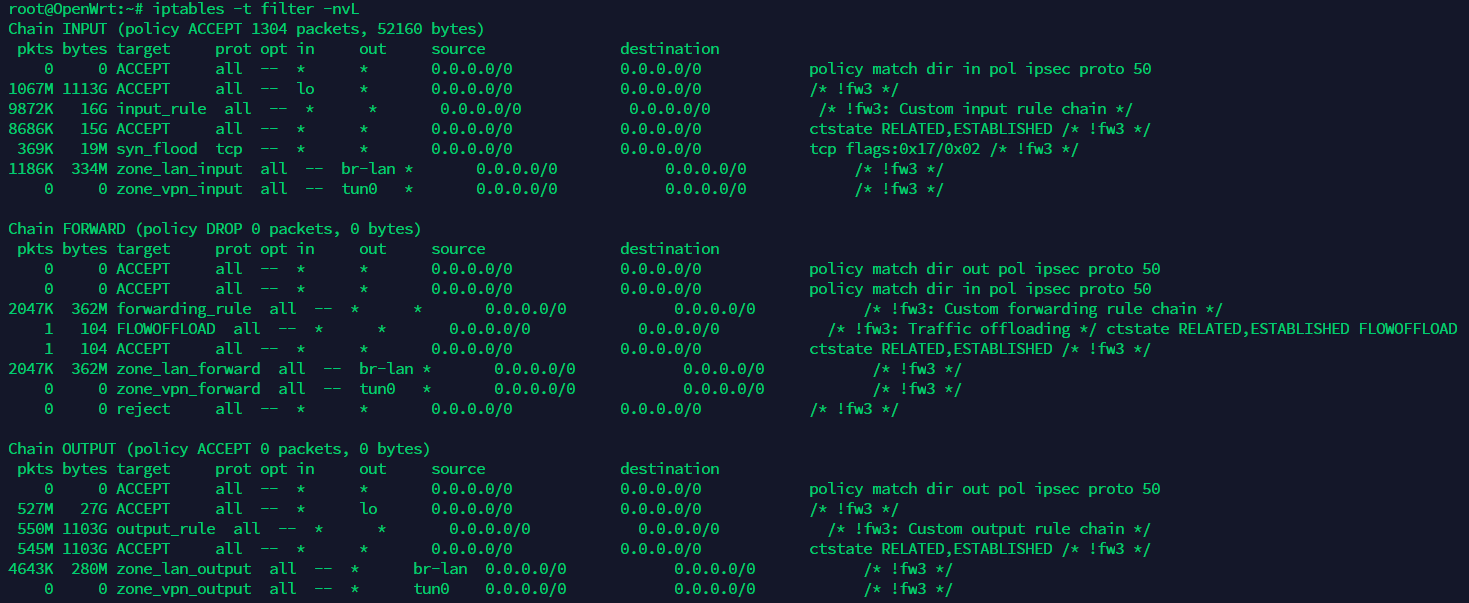
Note that the tables corresponding to each chain are not exactly the same; there is a many-to-many relationship between tables and chains. However, no matter how many tables a chain corresponds to, its tables are always searched and matched in the following priority order.
Table processing priority: raw > mangle > nat > filter.
2.2 Four Tables
The four tables of iptables are iptable_filter, iptable_mangle, iptable_nat, and iptable_raw. The default table is filter (used when no table is specified).
filter table: Used for packet filtering. The specific rules determine how to handle a packet. The corresponding kernel module isiptable_filter. It includes three chains:INPUT,FORWARD, andOUTPUT.nat table: NAT stands for Network Address Translation. It is mainly used to modify the IP address and port number information of packets. The corresponding kernel module isiptable_nat. It includes three chains:PREROUTING,POSTROUTING, andOUTPUT.mangle table: Mainly used to modify the packet’s Type of Service (ToS), Time to Live (TTL), and to set marks for packets to implement traffic shaping and policy routing. The corresponding kernel module isiptable_mangle. It includes five chains:PREROUTING,POSTROUTING,INPUT,OUTPUT, andFORWARD.raw table: Mainly used to decide whether to track the state of a packet. The corresponding kernel module isiptable_raw. It includes two chains:OUTPUTandPREROUTING.
The raw table is only used on the
PREROUTINGandOUTPUTchains. Because it has the highest priority, it can process received packets before the system performsip_conntrack(connection tracking). Once a user uses the raw table on a certain chain, after the raw table is processed, the NAT table andip_conntrackprocessing will be skipped—that is, address translation and packet link tracking will no longer be performed. The RAW table can be applied in scenarios where NAT is not required to improve performance.
2.3 Five Chains
The five chains of iptables are PREROUTING, INPUT, FORWARD, OUTPUT, and POSTROUTING.
INPUT chain: Applied when receiving packets destined for the firewall’s local address.OUTPUT chain: Applied when the firewall itself sends packets outward.FORWARD chain: Applied when receiving packets that need to be forwarded through the firewall to other addresses. Note that theip_forwardfunction in the Linux kernel must be enabled to achieve forward forwarding.PREROUTING chain: Applied before making routing decisions for the packet.POSTROUTING chain: Applied after making routing decisions for the packet.
2.4 Common Scenarios for iptables
Let’s use the flowchart above to analyze several common situations: The key point is whether the destination address of the packet sent to the iptables host is the iptables host itself. If it is, we can understand it as a common web server with an iptables firewall enabled. If it is not, it goes through ip_forward for forwarding, such as the NAT service of a common NAT router or policy routing. The figure below shows an OpenWrt router with the ip_forward function enabled.

3. NAT Principles
Next, we will introduce some basic knowledge of NAT (Network Address Translation). As is well known, IPv4 public IP addresses have been exhausted, but the number of devices needing internet access continues to increase. NAT plays a significant role in this (IPv6 is not discussed here). NAT servers provide a set of private IP address pools (10.0.0.0/8, 172.16.0.0/12, 192.168.0.0/16), allowing devices connected to the NAT server to obtain a private IP address (also called a LAN IP/internal IP). When a device needs to connect to the internet, the NAT server converts the device’s private IP into a public IP (globally unique) that can be routed on the internet. There are many ways to implement NAT, but here we mainly introduce three: Static NAT, Dynamic NAT, and Network Address Port Translation (NAPT).
3.1 BNAT
-
Static NAT: Also referred to as (N-to-N mapping) in LVS official documentation. The first N refers to the number of devices in the LAN that need to connect to the internet, and the second N refers to the number of public IPs owned by the NAT server. Since the numbers are equal, static translation can be achieved, meaning one device corresponds to one public IP. In this case, the NAT server only needs to maintain a static NAT mapping table.
Public IP Internal IP 219.152.168.222 192.168.1.55 219.152.168.223 192.168.1.59 219.152.168.224 192.168.1.155 -
Dynamic NAT: Also referred to as (M-to-N mapping) in LVS official documentation. Note that in this case M > N, meaning the number of devices in the LAN needing internet access is greater than the number of public IPs owned by the NAT server. At this point, the NAT server needs to implement dynamic translation, so the public IP used by each internal device to access the internet might not always be the same IP.
In some home routers, DMZ refers to an internal network host where all ports are exposed to the external network, while all other ports are forwarded. Strictly speaking, this is not a true DMZ because the host can still access the internal network and is not independent of it. A true DMZ does not allow access to the internal network; the DMZ and the internal network are separate. This type of DMZ host does not have the security advantages of sub-networking provided by a real DMZ; it is often just a simple method of forwarding all ports to another firewall or NAT device.
3.2 NAPT
Both of the above belong to Basic NAT (Basic NAT). This type of translation is technically simple and only supports address translation without port mapping, which leads to another problem: a waste of resources. We know that one IP can actually correspond to multiple ports, and we access applications through the form of IP address + port number (i.e., the client sends a request to the port where the server application is listening). NAPT is an extension of this foundation; it adds port numbers to the IP address and supports port mapping.
- NAPT: NAPT can be divided into Source Network Address Translation (SNAT) and Destination Network Address Translation (DNAT). Note that “source” and “destination” are relative to the NAT server. We can explain this using the following diagram:
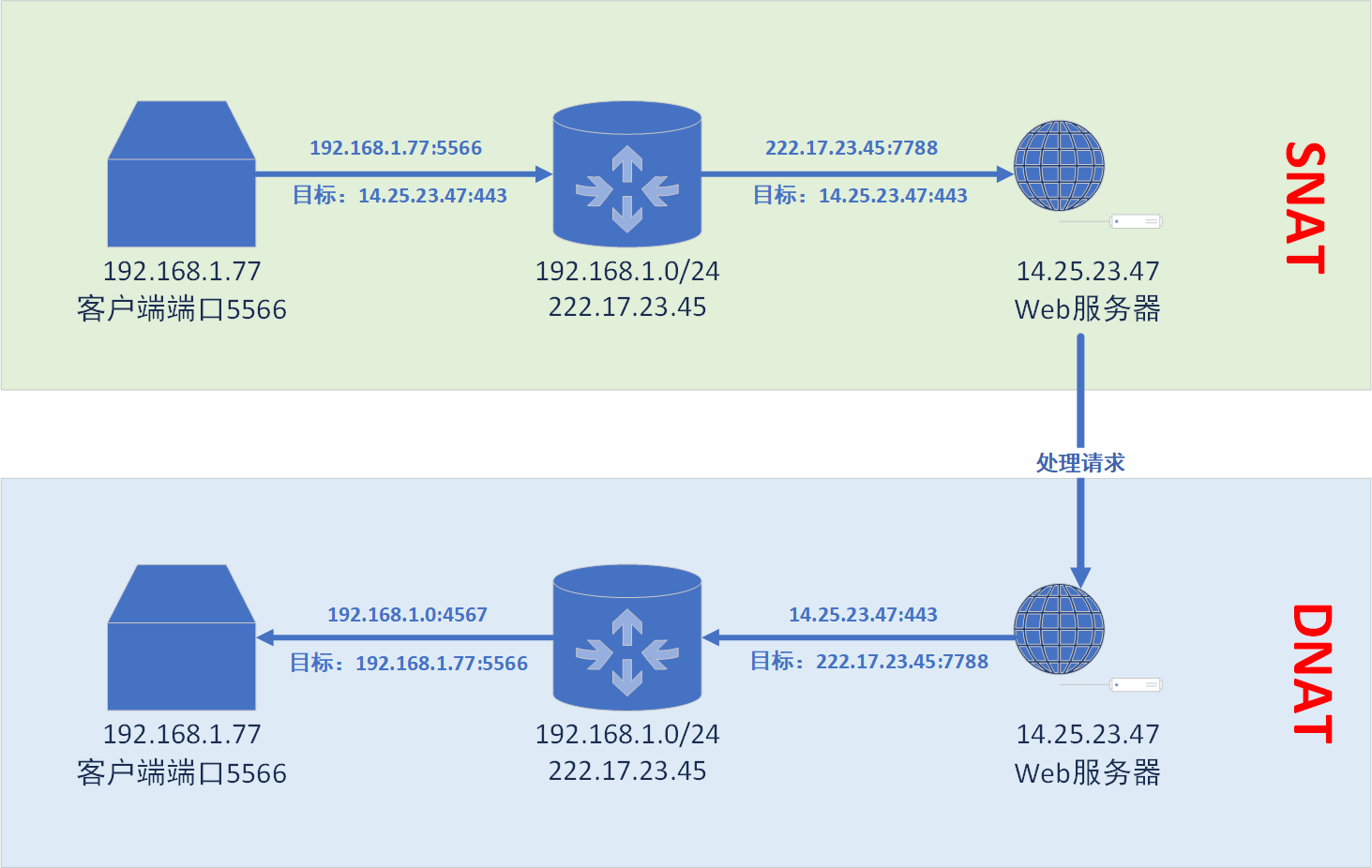
First, we have a client here running a browser, assuming it uses port 5566. it needs to access port 443 of the HTTPS service on the web server at 14.25.23.47. When it accesses, it passes through the router gateway (which is also the NAT server) at the LAN exit. The router performs a NAPT Source Address Translation (SNAT) on it. At this point, after the client’s request passes through the NAT server, it becomes the IP-port pair 222.17.23.45:7788 accessing port 443 of the Web server. Note that during this process, the IP and port of the target server (Web server) remain unchanged.
Next, after the Web server receives the request, it needs to return data to the device that sent the request. Note that the destination IP for the returned data should be 227.17.23.45:7788, which was the IP and port the NAT server used to send the request. At this point, the router gateway performs a NAPT Destination Address Translation (DNAT), where the destination IP and port become the original 192.168.1.77:5566 that initially sent the request.
In fact, for most people, the most common daily contact is with SNAT and DNAT operations performed by routers, which generally appear in pairs to solve the problem of insufficient public IP resources. It should be noted that NAT can be nested; that is, network devices under a NAT can continue to perform NAT, as long as the network segment of the new NAT does not conflict with the upper-level NAT.
4. iptables Configuration
After understanding the working principles of iptables and the functions of each table and chain, we can configure it specifically based on its characteristics.
The basic syntax and command format of iptables: